Forex signals that come with a stop, a target, and a reason
A forex signal should tell you the pair, the direction, where to get in, where to get out if you are wrong, and where to take profit. MarketPro publishes up to eight a day that do, then tracks each one to its conclusion.
- ✓ Entry, TP1–TP3 and stop on every signal
- ✓ Engine-scanned, then AI-reviewed
- ✓ Auto-tracked and closed
- ✓ Free signals every week
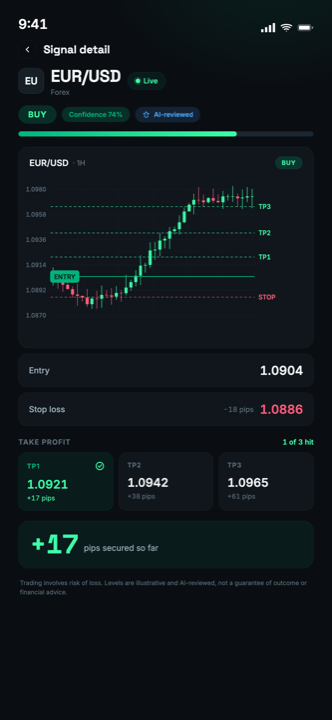
Illustrative example of the MarketPro signal card layout. Levels shown are for illustration and are not a live trade idea.
A forex signal is a trade idea for a currency pair that specifies the direction, an entry price, a stop-loss and one or more take-profit targets. MarketPro publishes up to eight vetted signals a day across major and cross pairs plus gold. Each is produced by a strategy engine, reviewed by an AI layer before publishing, and then tracked automatically until it closes at a target or the stop. Free weekly signals is free, with no card required.
Key takeaways
- A signal without a stop level is not a trade idea, it is a suggestion. You cannot size a position from it, so you cannot control what it costs you.
- The value of a signal service is in what it rejects, not what it sends. Volume is the easiest metric to fake and the least useful.
- MarketPro signals are tracked and closed in-app, so the outcome of every published idea stays visible instead of vanishing into a chat history.
- Signals work best alongside education. Copying trades you do not understand produces neither profit nor skill.
- No provider can guarantee results. Anyone quoting a win rate with no sample size, date range or methodology is telling you nothing.
What a forex signal actually is
A forex signal is a specific, time-bound trade proposal on a currency pair. At minimum it names the instrument and the direction. To be usable it also has to name the entry, the stop and the target, because those three numbers are what convert an opinion into something you can size, risk-manage and evaluate afterwards.
That last part matters more than it sounds. If a signal has no stop, there is no way to calculate a position size, which means there is no way to control the loss, which means one bad idea can undo a month of good ones. And if a signal has no defined target and no record of how it ended, there is no way to judge the provider. Every idea can be described as "still open" indefinitely.
Signals sit between two other things people confuse them with. Copy trading executes someone else's trades in your account automatically; you have no decision and no learning. A trading bot executes a fixed rule set without human involvement at all. A signal keeps you in the loop: you decide whether to take it, at what size, and when to exit.
What is inside a MarketPro signal
A signal that says "buy EUR/USD" is not actionable. You cannot size it, you cannot risk-manage it, and you have no way of knowing later whether it worked. Every MarketPro signal carries six things:
- The instrument and direction. Which pair, and whether the idea is a buy or a sell.
- An entry level. The price the idea is built around, not "get in wherever".
- A stop level. The price that says the idea was wrong. This is what makes the trade sizeable. Feed it into the position size calculator and you get a lot size.
- Three take-profit levels (TP1, TP2, TP3), so you can scale out rather than make one all-or-nothing decision.
- The reasoning. The setup type and timeframe, so the signal doubles as a lesson instead of an instruction.
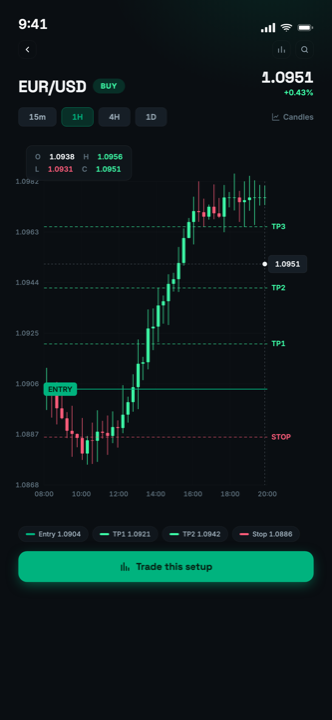
- A live chart with the levels drawn on it, so you can see the structure rather than take it on faith.
Once published, the signal is tracked automatically. When price reaches a take-profit or the stop, the app marks it and pushes a notification. You are not left to work out whether an idea from three days ago is still open. How to read a forex signal walks through a full example.
How a signal gets published
Two stages, and the second one is the point.
First, a strategy engine scans the instrument universe continuously, looking for structural setups (trend pullbacks, range fades, momentum continuations) and measuring each candidate against volatility, spread and the distance to the nearest level that would invalidate it. Most candidates die here.
Second, anything that survives is reviewed by an AI layer before it can reach a user. That layer sees the diagnostics behind the setup and the instrument's own published history, and it can reject a technically valid setup for reasons the scan cannot see: an event risk sitting inside the expected holding period, a spread that eats the edge, a target that needs more room than the session normally gives.
Only what passes both stages is published, and up to eight signals a day get through. The rejection rate is the feature. A service that publishes everything it finds is not filtering, and a signal you cannot trust is worse than no signal, because it costs you money to discover it was wrong.
We publish the whole record rather than a headline: every closed signal, pair by pair, losses included, with the rules used to count it. See the track record, and our editorial policy for what we will and will not claim.
Which pairs are covered
Coverage is the major and cross currency pairs plus gold. In practice that means the instruments with enough liquidity for the spread not to dominate the outcome, and enough participation for technical structure to mean something.
The majors (EUR/USD, GBP/USD, USD/JPY, USD/CHF, USD/CAD, AUD/USD, NZD/USD) carry the tightest spreads and the most consistent behaviour, which makes them the backbone of the feed. The crosses (EUR/JPY, GBP/JPY, EUR/GBP and the rest) move further and trend more cleanly, at the cost of a wider spread. Gold is its own case: it responds to real yields and risk sentiment rather than an interest-rate differential, and its ranges are several times a currency pair's.
What is deliberately absent is exotic pairs. The spread on an exotic frequently exceeds the edge of any short-term setup, so publishing signals on them would be selling activity rather than opportunity.
Every pair's closed signals are public with their outcomes, losses included: 855 of them so far, in the track record, pair by pair.
What signals cannot do
Worth stating plainly, because the category is full of people who will not.
No signal service can tell you what price will do. A signal is a structured, filtered opinion with a defined invalidation point. Some will lose. A service whose marketing implies otherwise (guaranteed returns, "100% accurate", a win rate quoted with no sample size or timeframe attached) is describing something that does not exist.
Signals also cannot manage your account. The position size is yours, the decision to take the trade is yours, and the discipline to honour the stop is yours. Two people can follow the same signal for a month and get completely different results purely from how they sized and exited. That is why MarketPro ships an academy and calculators alongside the feed rather than just the feed.
Trading foreign exchange and other leveraged instruments carries a high level of risk and can result in the loss of some or all of your capital. Signals and educational content provided in MarketPro are for informational purposes only and do not constitute investment advice, a recommendation, or a solicitation to trade. Past performance is not indicative of future results. You are solely responsible for your own trading decisions. Only trade with money you can afford to lose, and seek independent advice if necessary.
Getting signals free
MarketPro gives every account vetted free signals every week, at no cost, with no card required. It is the same signal premium users see, with the same levels and the same tracking, not a delayed or degraded version. The free tier exists so you can judge the quality before paying for it, which is the only fair way to sell something whose value you cannot demonstrate in an advert.
Premium unlocks every live signal. It can also be earned rather than paid: referrals, in-app rewards and broker cashback all convert into free premium days. How the free tier works covers the detail.
Where to go next
The same signal format, applied to the instruments people search for by name.
Gold signals
XAU/USD trade ideas, and why gold needs different level placement from a currency pair.
Gold signalsXAUUSD signals
The instrument itself: contract size, pip convention, spread behaviour and session ranges.
XAUUSD detailFree forex signals
What you get at zero spend, and how to earn premium days without paying for them.
Free signalsBetter than a Telegram group
Why signals in a chat app lose their history, and what an app does differently.
The comparisonHow to judge a provider
Seven checks that separate a real signal service from a marketing operation.
The checklistForex signals app
What a signals app should do that a feed cannot: tracking, alerts, charts and sizing.
The appFrequently asked questions
What are forex signals?
Are forex signals worth it?
How many signals a day does MarketPro send?
Do I need a broker to use MarketPro signals?
What timeframes do the signals use?
What happens when a signal hits its target?
Take a free signal this week
Vetted free signals every week, free, with the full levels and the reasoning behind it. No card needed to start.
Not investment advice. Past performance is not indicative of future results.