Download MarketPro, free to start
Vetted forex and gold signals with every level written down, a full academy so you understand each trade, and rewards that pay your premium back. Install it on the device you are reading this on.
✓ Free to install · ✓ 2 vetted free signals every week · ✓ No card needed to start
Four steps, and the first three are free
You can be reading a real, vetted trade idea within a couple of minutes of installing.
-
Install MarketPro
Pick your store above. The app is free to install on iOS and Android, and there is no card to enter before you can use it.
-
Open your free weekly signals
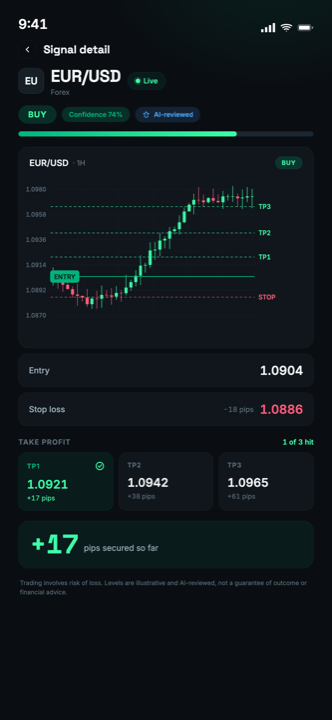
Every account, paid or not, gets 2 vetted free signals a week, each with its entry, stop and three take-profit levels spelled out, plus the setup type and timeframe behind it.
-
Learn why the trade exists
The academy is unlocked in full on free accounts. Every signal names its setup, so the feed and the lessons teach the same vocabulary.
-
Earn premium back
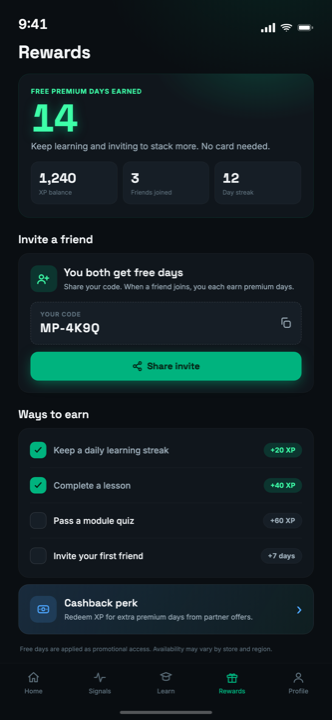
Referrals, in-app rewards and broker cashback on a linked Exness or XM account all convert into premium days, so the subscription can pay for itself.
What is actually inside the app
Three products in one: the signal feed, the academy, and the rewards that offset the cost.
Vetted signals, not shouted calls
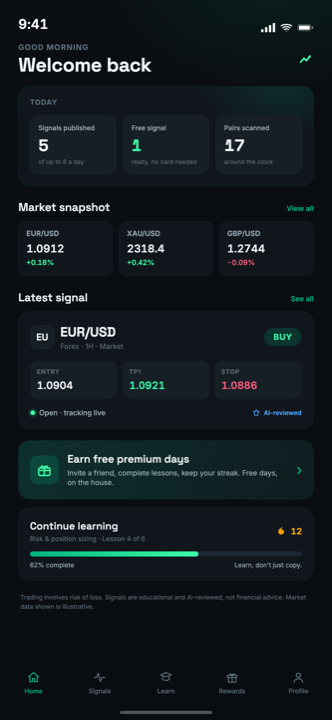
Up to 8 a day across major and cross forex pairs plus gold (XAU/USD). Each one is scanned by the strategy engine and reviewed before it is published, then tracked and closed automatically at its real outcome.
Every level, written down
Entry, stop and 3 take-profit levels on every signal, with the chart attached. Nothing is left for you to guess at, and nothing is edited after the fact.
A full academy, free
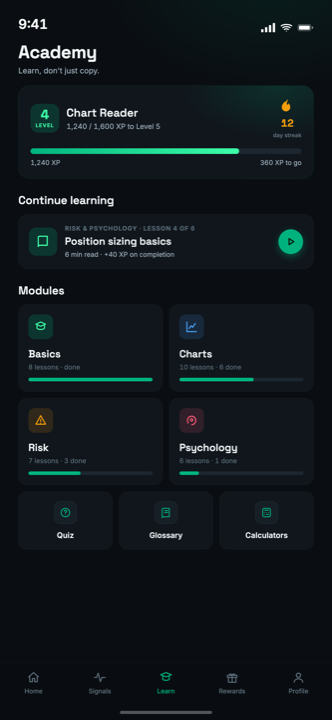
Lessons, quizzes, XP and streaks, plus an 81-term glossary. Not capped on free accounts.
Eleven calculators
Position size, pip value, margin, risk of ruin and more, in the app and free on the web with no sign-up.
Cashback on your own broker
Link an Exness or XM account and part of the spread and commission you already pay comes back to you.
5 languages
English, Spanish, Arabic, Portuguese, French, including full right-to-left layout for Arabic.
MarketPro on your phone
Real screens from the current release, not mock-ups.
Before you install, the honest part
MarketPro does not guarantee a profit and no one honestly can. Signals are researched trade ideas, not advice, and losing trades are a normal part of any strategy. The app never touches your account, so every position is one you chose to open, at a size you chose. Read the risk disclosure before you trade with real money.
Downloading MarketPro
Is MarketPro free to download?
Which devices does MarketPro run on?
Do I need a broker account to use the app?
Does MarketPro trade for me?
Is there a downloadable bot or EA?
How do I cancel a subscription?
Take your first free signal today
Install MarketPro, open the signal of the day, and see what a vetted, AI-reviewed idea actually looks like before you decide anything.
✓ Free to install · ✓ 2 vetted free signals every week · ✓ No card needed to start
Not investment advice. Past performance is not indicative of future results.