A forex signals app that tracks the trade after it sends it
Receiving a signal is the easy part. What decides whether it is useful is everything after: the chart, the sizing, the alert when a level is hit, and the record of how it ended.
- ✓ iOS, Android and web
- ✓ Push alerts on every level
- ✓ Built-in calculators
- ✓ Five languages
A forex signals app should do four things a message feed cannot: draw the levels on a live chart, track the trade automatically and alert you as each level is hit, help you size the position, and keep a permanent record of how every past idea ended. MarketPro does all four on iOS, Android and the web, with free vetted signals every week.
Key takeaways
- The difference between an app and a feed is state. An app knows a signal is still open; a chat message does not.
- Push alerts per level mean you do not have to watch a chart to know a target was hit.
- Sizing tools inside the app remove the step where most people give up and guess a lot size.
- A permanent, in-app history is what makes a provider checkable instead of merely confident.
What the app does
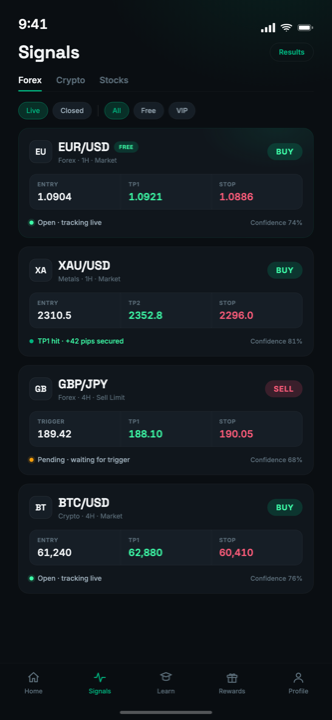
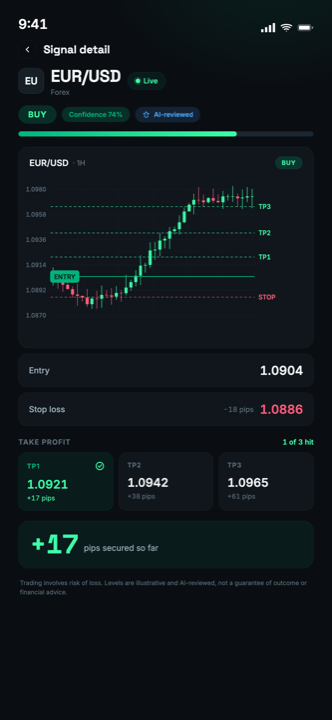
Signal feed. Every published idea with entry, stop, three take-profit levels, the setup type, the timeframe and a chart with the levels drawn on it. Free accounts see one a day; premium sees all of them.
Automatic tracking. Once a signal is live, price is monitored against its levels. When TP1 is touched the signal is marked and you get a push notification; the same for TP2, TP3 and the stop. When it finishes, the signal closes itself and moves into the history.
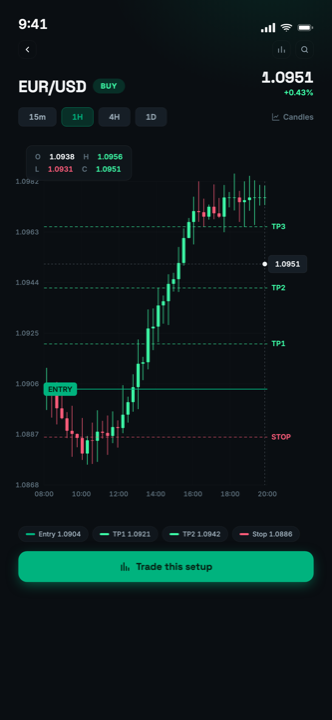
Charts. Interactive charts on every signal, so you can see the structure the setup is built on rather than trusting four numbers.
Calculators. Position size, pip value, margin, profit, risk-to-reward and compounding, on the same screen as the signal. The web versions add pivot points, Fibonacci, drawdown, risk of ruin, leverage and cashback.
Academy. Structured lessons, quizzes, XP, streaks and a glossary, so every signal doubles as a lesson. See the learning hub.
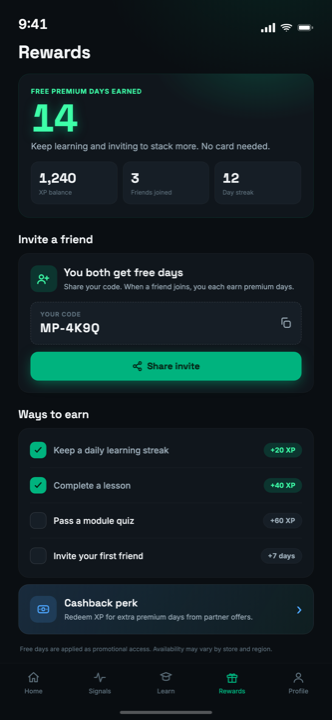
Rewards. Referrals, streak rewards and broker cashback that convert into free premium days.
Platforms and languages
MarketPro runs on iOS, Android and in the browser. The account is the same across all three: entitlements, signal history and academy progress follow you, so a signal read on a phone at breakfast is the same tracked signal on a desktop at lunch.
The interface is available in English, Spanish, Arabic, Portuguese and French, with full right-to-left layout support for Arabic rather than a mirrored afterthought.
Push notifications work on iOS, Android and modern desktop browsers. On iOS Safari, web push requires the app to be installed to the home screen first. An Apple platform constraint, not a MarketPro one.
Why an app rather than a feed
The honest answer is that a chat channel has no memory and no state. A signal posted to a group is a message: it does not know whether it is still open, it cannot notify you when a target is hit, it scrolls away within an hour, and it can be edited or deleted after the fact. Every structural weakness of chat-based signal delivery follows from those facts.
An app holds a signal as an object with a status. That is what makes tracking, per-level alerts, an auditable history and a real performance record possible at all. The full comparison with Telegram groups goes through each difference.
Also available in the browser
The full app runs on the web as well as on mobile, with the same account and the same signals. App Store · Google Play.
Frequently asked questions
Is there a MarketPro app for iPhone and Android?
Do I need to keep the app open to get alerts?
Does the app place trades for me?
What languages does the app support?
Get the app free
iOS, Android or the browser. Vetted free signals every week, at no cost, tracked from publish to close.
Not investment advice. Past performance is not indicative of future results.